Touchless Coffee Machine Instructions
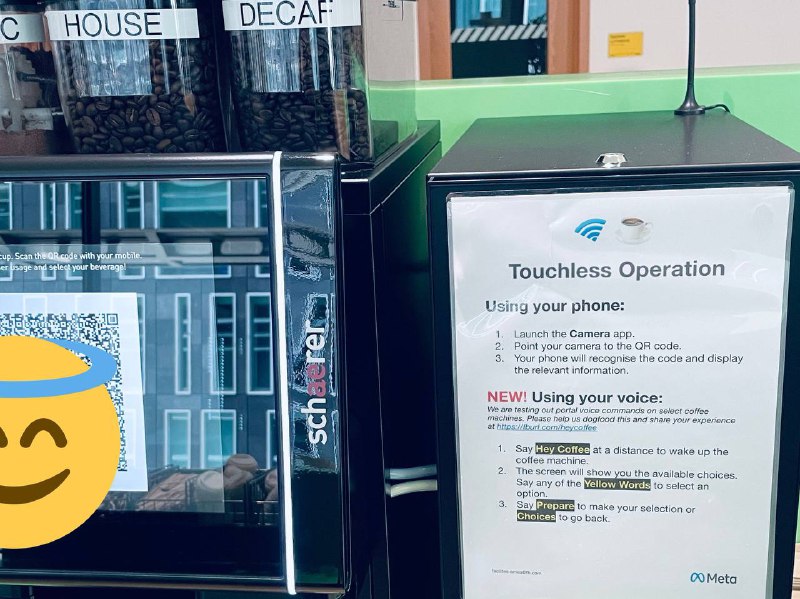
C HOUSE DECAF Touchless Operation Using your phone: 1. Launch the Camera app. 2. Point your camera at the QR code. 3. Your phone will recognise the code and display the relevant information. NEW! Using your voice: We are testing our portal voice commands on select coffee machines. Please help us by testing and share your experience at https://bit.ly/coffeevoice 1. Say Hey Coffee at a distance to wake up the coffee machine. 2. The screen will show you the available choices. Say the Yellow Words to select an option. 3. Say Prepare to make your selection or Choices to go back.
A coffee machine displays instructions for touchless operation using a phone or voice commands. The joke is the absurdly specific voice interface, where users must say “Hey Coffee,” “Yellow Words,” “Prepare,” or “Choices” to operate the machine, making an ordinary coffee purchase feel like a futuristic or overly complicated system. EN: A coffee machine displays instructions for touchless operation using a phone or voice commands. The joke is the absurdly specific voice interface, where users must say “Hey Coffee,” “Yellow Words,” “Prepare,” or “Choices” to operate the machine, making an ordinary coffee purchase feel like a futuristic or overly complicated system.
coffee machine / кофейный автоматcoffee bean hoppers / контейнеры с кофейными зёрнамиcoffee beans / кофейные зёрнаinstruction sign / информационная табличкаQR code / QR-кодsmartphone camera interface / интерфейс камеры смартфонаtouchless operation sign / табличка о бесконтактной работеvoice command instructions / инструкции по голосовым командамhighlighted words / выделенные словаblack machine casing / чёрный корпус автоматаgreen countertop / зелёная столешницаcoffee cup icon / значок чашки кофеWi-Fi icon / значок Wi-FiMeta logo / логотип Meta
- @rzeczyzabawne / 9775 2023-06-01
- Type
- image
- Size
- 800×599 · 110.3 KiB
- Mood
- absurd, sarcastic
- Language
- en
- Added