Browser Compatibility Problem
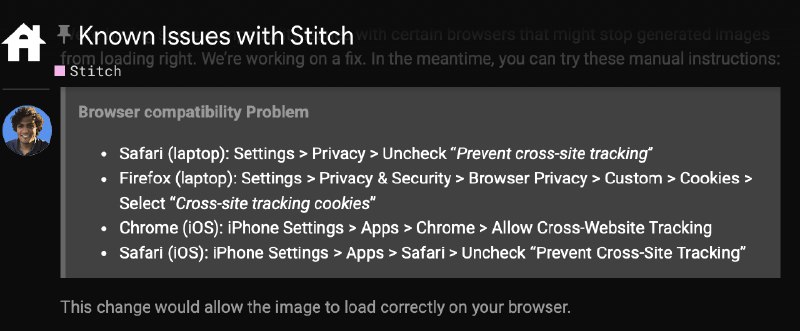
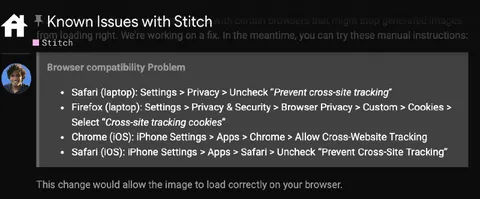
Known Issues with Stitch with certain browsers that might stop generated images from loading images. We're working on a fix. In the meantime, you can try these manual instructions: Stitch Browser compatibility Problem Safari (laptop): Settings > Privacy > Uncheck “Prevent cross-site tracking” Firefox (laptop): Settings > Privacy & Security > Browser Privacy > Custom > Cookies > Select “Cross-site tracking cookies” Chrome (iOS): iPhone Settings > Apps > Chrome > Allow Cross-Website Tracking Safari (iOS): iPhone Settings > Apps > Safari > Uncheck “Prevent Cross-Site Tracking” This change would allow the image to load correctly on your browser.
A dark browser troubleshooting screenshot for Google’s Stitch AI demo lists manual steps for disabling cross-site tracking protections in Safari, Firefox, and Chrome. The joke is that a supposedly advanced AI demo requires users to weaken browser privacy and security settings just to load generated images, making the launch feel absurd and inconvenient. EN: A dark browser troubleshooting screenshot for Google’s Stitch AI demo lists manual steps for disabling cross-site tracking protections in Safari, Firefox, and Chrome. The joke is that a supposedly advanced AI demo requires users to weaken browser privacy and security settings just to load generated images, making the launch feel absurd and inconvenient.
browser troubleshooting page / страница устранения неполадок браузераdark interface / тёмный интерфейсhome icon / значок домаprofile avatar / аватар профиляtext heading / текстовый заголовокbullet list / маркированный списокSafari browser / браузер SafariFirefox browser / браузер FirefoxChrome browser / браузер Chromelaptop / ноутбукiPhone / айфонprivacy settings / настройки конфиденциальностиsecurity settings / настройки безопасностиcookies / файлы cookiecross-site tracking / межсайтовое отслеживаниеgenerated image / сгенерированное изображениеinstruction text / текст инструкцииgray panel / серая панель
#stitch#браузер#browser#google ai#google ии#искусственный интеллект#artificial intelligence#privacy#конфиденциальность#security#безопасность#cross-site tracking#межсайтовое отслеживание#safari#firefox#chrome#настройки#settings#техническая поддержка#tech support#ирония#irony#сарказм#sarcasm#reaction#реакция#screenshot#скриншот
- @gentoomemes / 17410 2025-05-21
- Type
- image
- Size
- 800×331 · 54.2 KiB
- Mood
- саркастичный
- Language
- en
- Added