IT Helpdesk in 2004 vs 2024
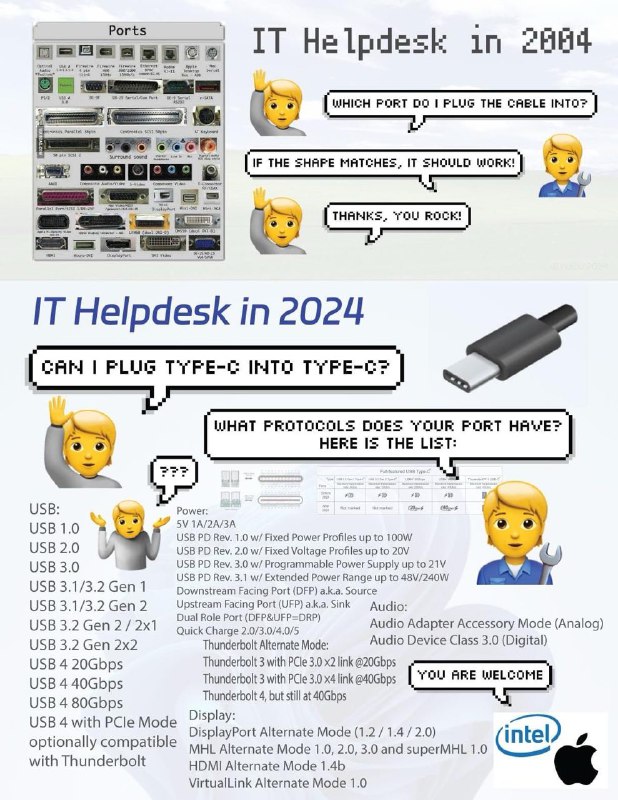
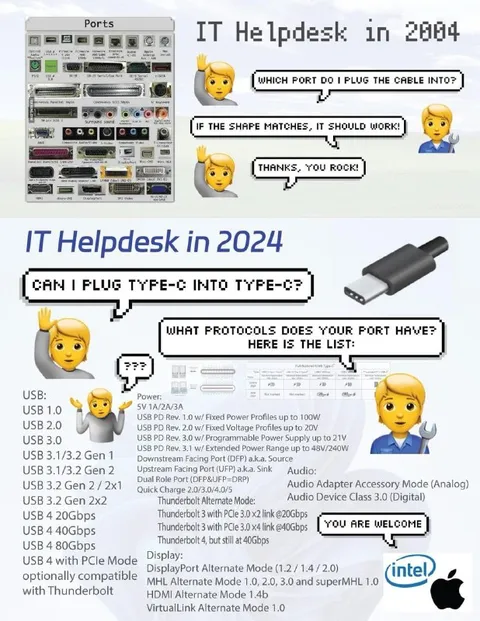
Ports IT Helpdesk in 2004 WHICH PORT DO I PLUG THE CABLE INTO? IF THE SHAPE MATCHES, IT SHOULD WORK! THANKS, YOU ROCK! IT Helpdesk in 2024 CAN I PLUG TYPE-C INTO TYPE-C? WHAT PROTOCOLS DOES YOUR PORT HAVE? HERE IS THE LIST: ??? USB: USB 1.0 USB 2.0 USB 3.0 USB 3.1/3.2 Gen 1 USB 3.1/3.2 Gen 2 USB 3.2 Gen 2 × 2 USB 3.2 Gen 2x2 USB 4 20Gbps USB 4 40Gbps USB 4 80Gbps USB 4 with PCIe Mode optionally compatible with Thunderbolt Power: 5V/1A/2A/3A USB PD Rev. 1.0 w/ Fixed Power Profiles up to 100W USB PD Rev. 2.0 w/ Fixed Voltage Profiles up to 20V USB PD Rev. 3.0 w/ Programmable Power Supply up to 21V USB PD Rev. 3.1 w/ Extended Power Range up to 48V/240W Downstream Facing Port (DFP) aka. Source Upstream Facing Port (UFP) aka. Sink Dual Role Port (DFP&UFP=DRP) Quick Charge 2.0/3.0/4.0/5 Thunderbolt Alternate Mode: Thunderbolt 3 with PCIe 3.0 x2 link @20Gbps Thunderbolt 3 with PCIe 3.0 x4 link @40Gbps Thunderbolt 4, but still at 40Gbps Audio: Audio Adapter Accessory Mode (Analog) Audio Device Class 3.0 (Digital) Display: DisplayPort Alternate Mode (1.2 / 1.4 / 2.0) MHL Alternate Mode 1.0, 2.0, 3.0 and superMHL 1.0 HDMI Alternate Mode 1.4b VirtualLink Alternate Mode 1.0 YOU ARE WELCOME intel
The meme contrasts an old computer helpdesk with a simple port panel and a modern USB-C setup overloaded with confusing standards, protocols, power modes, audio modes, and display modes. In 2004, the advice is simply to match the cable shape; in 2024, even plugging Type-C into Type-C requires checking a long technical specification list. It is sent as a reaction to overly complicated modern technology and the frustration of USB-C compatibility.
computer port panel / панель компьютерных портовUSB cables / USB-кабелиUSB-C connector / разъём USB-Cblond shrugging woman emoji / блондинка-эмодзи пожимающая плечамиblond male technician emoji / блондин-эмодзи техникwrench / гаечный ключspeech bubbles / речевые облачкаUSB specification list / список спецификаций USBprotocol table / таблица протоколовIntel logo / логотип IntelApple logo / логотип Applewhite background / белый фонtechnical labels / технические подписи
- @gentoomemes / 9361 2024-02-13
- @profunctor_io / 9786 2024-02-13
- @ithueti / 11815 2024-02-13
- @rzeczyzabawne / 15067 2024-02-15
- @right_wing_dev_squads / 12297 2025-06-11
- Type
- image
- Size
- 618×800 · 126.6 KiB
- Mood
- sarcastic, frustrated
- Language
- en
- Added