Disable GPU for Rounded Corners
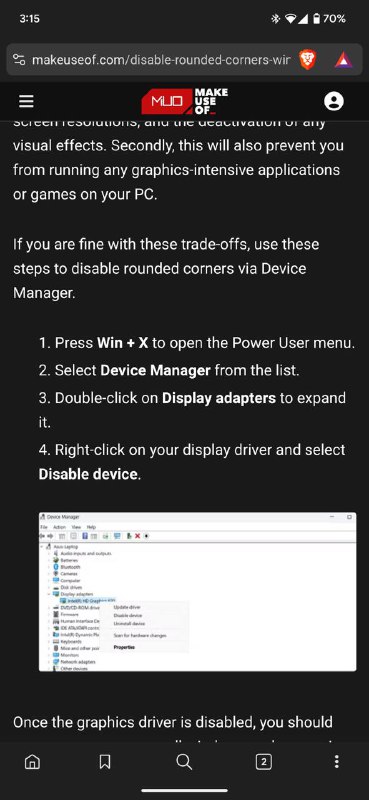
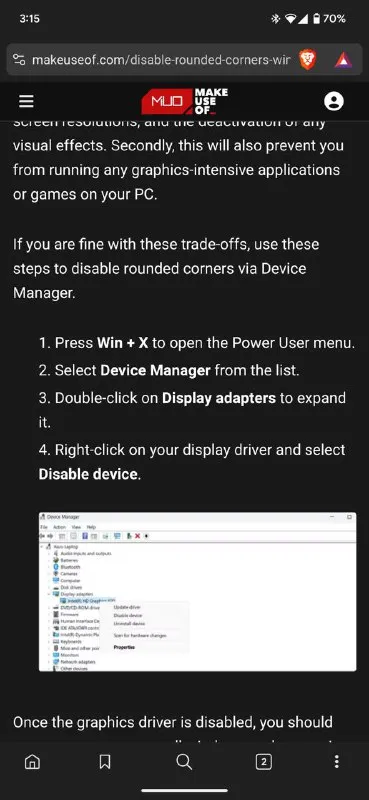
Screen resolutions, and the activation of visual effects. Secondly, this will also prevent you from running any graphics-intensive applications or games on your PC. If you are fine with these trade-offs, use these steps to disable rounded corners via Device Manager. 1. Press Win + X to open the Power User menu. 2. Select Device Manager from the list. 3. Double-click on Display adapters to expand it. 4. Right-click on your display driver and select Disable device. Once the graphics driver is disabled, you should
A browser screenshot shows instructions for disabling rounded corners in Windows 11 through Device Manager, including disabling the display driver. The joke is that this extreme solution removes rounded corners by disabling the GPU, which also prevents graphics-intensive applications and games from running. EN: A browser screenshot shows instructions for disabling rounded corners in Windows 11 through Device Manager, including disabling the display driver. The joke is that this extreme solution removes rounded corners by disabling the GPU, which also prevents graphics-intensive applications and games from running.
smartphone screenshot / скриншот смартфонаweb browser / веб-браузерcomputer settings article / статья о настройках компьютераDevice Manager window / окно диспетчера устройствdisplay adapter list / список видеоадаптеровgraphics driver / графический драйверcomputer monitor / компьютерный мониторWindows 11 interface / интерфейс Windows 11numbered instructions / нумерованные инструкцииdark webpage / тёмная веб-страница
#windows 11#виндовс 11#rounded corners#закруглённые углы#gpu#графический процессор#graphics driver#графический драйвер#device manager#диспетчер устройств#disable driver#отключение драйвера#computer settings#настройки компьютера#tech joke#техническая шутка#sarcasm#сарказм#absurd#абсурд#screenshot#скриншот#reaction#реакция
- @gentoomemes / 16082 2025-02-18
- Type
- image
- Size
- 369×800 · 52.8 KiB
- Mood
- саркастичный, абсурдный
- Language
- en
- Added