CSS Before and After
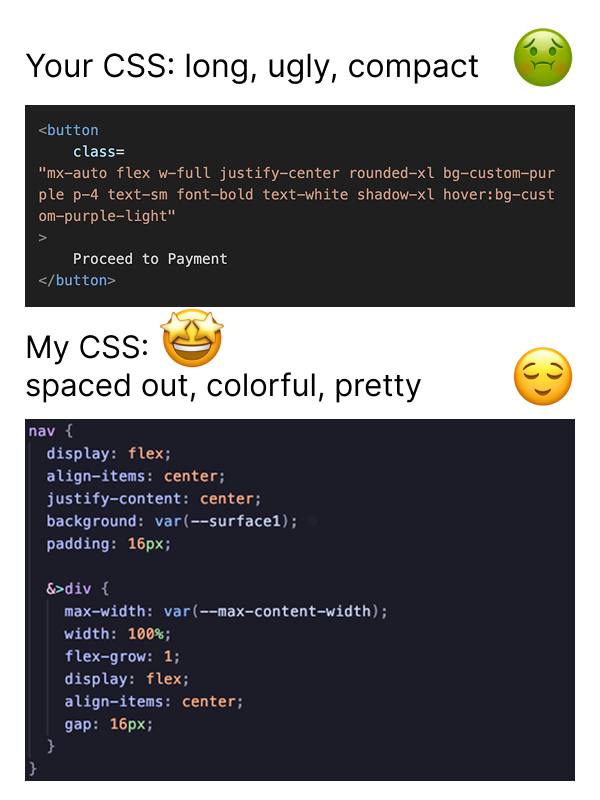
Your CSS: long, ugly, compact 🤢 My CSS: 🤩 spaced out, colorful, pretty 😌 <button class= "mx-auto flex w-full justify-center rounded-xl bg-custom-purple p-4 text-sm font-bold text-white shadow-xl hover:bg-custom-purple-light" > Proceed to Payment </button> nav { display: flex; align-items: center; justify-content: center; background: var(--surface1); padding: 16px; &>div { max-width: var(--max-content-width); width: 100%; flex-grow: 1; display: flex; align-items: center; gap: 16px; } }
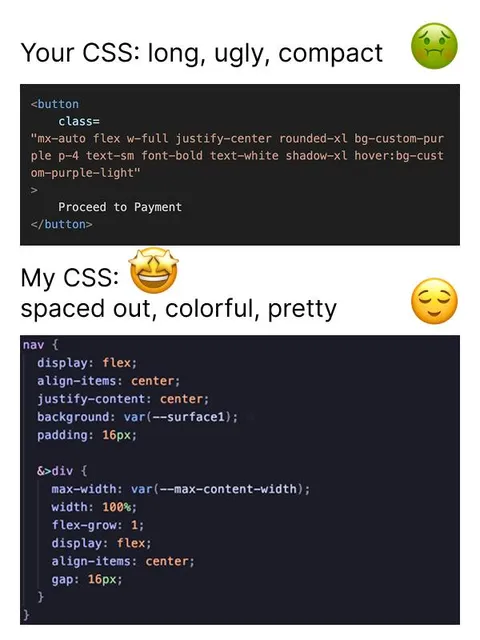
Мем сравнивает два подхода к написанию CSS. Сверху показана длинная, перегруженная и некрасивая строка классов для кнопки оплаты, а снизу — аккуратно отформатированный, красочный и читаемый CSS. Шутка высмеивает разработчиков, которые предпочитают эстетичный и разнесённый по строкам код компактным utility-классам. EN: The meme compares two approaches to writing CSS. At the top is a long, cluttered, ugly class string for a payment button, while the bottom shows neatly formatted, colorful, readable CSS. The joke pokes fun at developers who prefer aesthetically pleasing, spaced-out code over compact utility classes.
code editor screenshot / скриншот редактора кодаHTML button / HTML-кнопкаpayment button / кнопка оплатыCSS code / CSS-кодcode text / текст кодаnauseated face emoji / эмодзи с тошнотойstar-struck face emoji / эмодзи с глазами-звёздамиrelieved face emoji / эмодзи облегченияwhite background / белый фонdark code panel / тёмная панель с кодомpurple syntax highlighting / фиолетовая подсветка синтаксиса
- @gentoomemes / 15890 2025-02-07
- Type
- image
- Size
- 600×800 · 42.2 KiB
- Mood
- саркастичный, relatable
- Language
- en
- Added