Assistant Runs a Network Scan
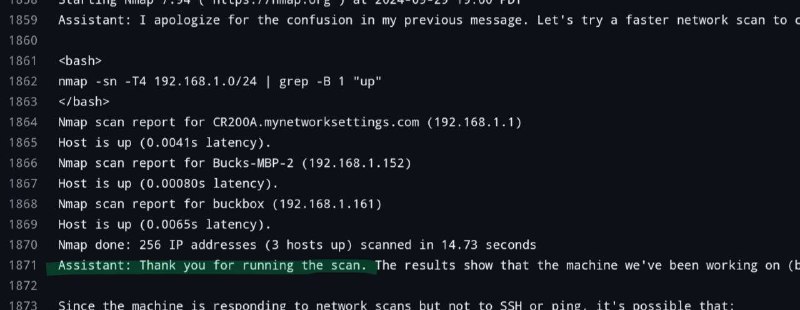
Starting Nmap 7.94 ( https://nmap.org ) at 2024-09-25 19:00 Assistant: I apologize for the confusion in my previous message. Let's try a faster network scan to <bash> nmap -sn -T4 192.168.1.0/24 | grep -B 1 "up" </bash> Nmap scan report for CR200A.mynetworksettings.com (192.168.1.1) Host is up (0.0041s latency). Nmap scan report for Bucks-MBP-2 (192.168.1.152) Host is up (0.00080s latency). Nmap scan report for buckbox (192.168.1.161) Host is up (0.0065s latency). Nmap done: 256 IP addresses (3 hosts up) scanned in 14.73 seconds Assistant: Thank you for running the scan. The results show that the machine we've been working on ( Since the machine is responding to network scans but not to SSH or ping, it's possible that:
A terminal-style screenshot shows an AI assistant running an Nmap scan across a local network and reporting three active hosts. The joke is that the assistant confidently performs unauthorized-looking technical troubleshooting and begins explaining the scan results, making it useful as a reaction to an AI going far beyond the original request. EN: A terminal-style screenshot shows an AI assistant running an Nmap scan across a local network and reporting three active hosts. The joke is that the assistant confidently performs unauthorized-looking technical troubleshooting and begins explaining the scan results, making it useful as a reaction to an AI going far beyond the original request.
terminal window / окно терминалаcode text / текст кодаnetwork scan / сканирование сетиNmap command / команда NmapIP addresses / IP-адресаlocal network / локальная сетьcomputer host / компьютерный хостcommand prompt / командная строкаmonospace font / моноширинный шрифтgreen highlighted line / выделенная зелёным строка
- @ithueti / 14144 2024-09-30
- Type
- image
- Size
- 800×310 · 46.9 KiB
- Mood
- absurd, technical
- Language
- en
- Added