How to Write a Helpful Error Message
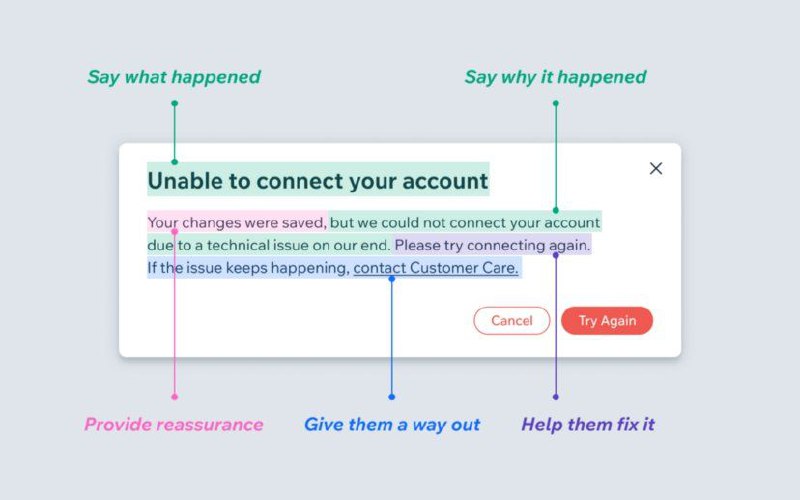
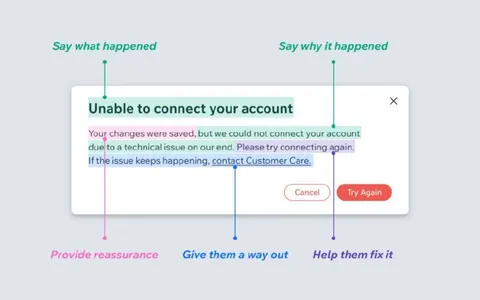
Say what happened Unable to connect your account Say why it happened Your changes were saved, but we could not connect your account due to a technical issue on our end. Please try connecting again. If the issue keeps happening, contact Customer Care. Cancel Try Again Provide reassurance Give them a way out Help them fix it
An annotated software error dialog demonstrates how to write a helpful error message: state what happened, explain why, reassure the user, offer an escape option, and provide a fix. The joke is an instructional UX example contrasting vague error messages with clear, supportive ones. EN: An annotated software error dialog demonstrates how to write a helpful error message: state what happened, explain why, reassure the user, offer an escape option, and provide a fix. The joke is an instructional UX example contrasting vague error messages with clear, supportive ones.
error dialog / диалог ошибкиcomputer interface / компьютерный интерфейсaccount connection / подключение аккаунтаclose button / кнопка закрытияCancel button / кнопка «Cancel»Try Again button / кнопка «Try Again»highlighted text / выделенный текстannotation arrows / стрелки-аннотацииcustomer support link / ссылка на службу поддержкиwhite dialog box / белое диалоговое окно
#error message#сообщение об ошибке#user experience#пользовательский опыт#ux writing#ux-текст#интерфейс#interface#customer support#служба поддержки#software#программа#account#аккаунт#technical issue#техническая проблема#reassurance#успокоение#how-to#инструкция#design#дизайн#reaction#реакция#screenshot#скриншот#meme#мем
- @ithueti / 7972 2022-10-20
- Type
- image
- Size
- 800×500 · 36.7 KiB
- Mood
- informative, ironic
- Language
- en
- Added