FFmpeg Tutorial Found
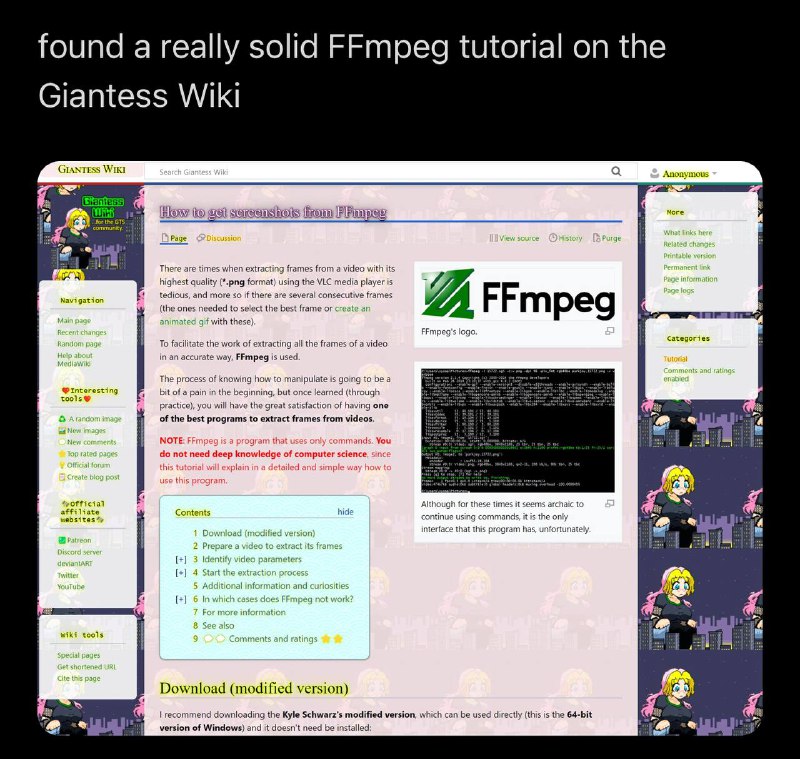
found a really solid FFmpeg tutorial on the Giantess Wiki GIANTESS WIKI Search Giantess Wiki Anonymous How to get screenshots from FFmpeg Page Discussion View source History Purge There are times when extracting frames from a video with its highest quality (*.png format) using the VLC media player is tedious, and more so if there are several consecutive frames (the ones needed to select the best frame or create an animated gif with these). To facilitate the work of extracting all the frames of a video in an accurate way, FFmpeg is used. The process of knowing how to manipulate is going to be a bit of a pain in the beginning, but once learned (through practice), you will have the great satisfaction of having one of the best programs to extract frames from videos. NOTE: FFmpeg is a program that uses only commands. You do not need deep knowledge of computer science, since this tutorial will explain in a detailed and simple way how to use this program. Contents hide 1 Download (modified version) 2 Prepare a video to extract its frames 3 Identify video parameters 4 Start the extraction process 5 Additional information and curiosities 6 In which cases does FFmpeg not work? 7 For more information 8 See also 9 Comments and ratings FFmpeg FFmpeg's logo. Although these times it seems archaic to continue using this commands, it is the only interface that this program has, unfortunately. Download (modified version) I recommend downloading the Kyle Schwarzer's modified version, which can be used directly (this is the 64-bit version of Windows) it doesn't need be installed: More What links here Related changes Printable version Permanent link Page information Page logs Categories Tutorial Comments and ratings enabled Navigation Main page Recent changes Random page Help about MediaWiki Interesting tools A random image New images New comments Top rated pages Official forum Create blog post Official affiliates Patreon Discord server devianART Twitter YouTube Wiki tools Special pages Get shortened URL Cite this page
The meme shows a large caption saying someone found a very solid FFmpeg tutorial on the Giantess Wiki, displayed over a screenshot of an old, cluttered wiki page explaining how to extract video frames with FFmpeg. The joke is the absurdly specific and unexpectedly useful discovery of a technical tutorial on a bizarre-looking giantess-themed website, making it suitable as a reaction to finding surprisingly good information in an unlikely place. EN: The meme shows a large caption saying someone found a very solid FFmpeg tutorial on the Giantess Wiki, displayed over a screenshot of an old, cluttered wiki page explaining how to extract video frames with FFmpeg. The joke is the absurdly specific and unexpectedly useful discovery of a technical tutorial on a bizarre-looking giantess-themed website, making it suitable as a reaction to finding surprisingly good information in an unlikely place.
- @gentoomemes / 2592 2023-02-22
- Type
- image
- Size
- 800×759 · 138.2 KiB
- Mood
- absurd, ironic
- Language
- en
- Added